Audiobook Downloader and Converter Online Tutorial
How to Use Audiobook Converter?
In Audiobook Downloader, click the “Open Audiobook Converter” button to launch the Audiobook Converter tool.
Configure the Destination Folder
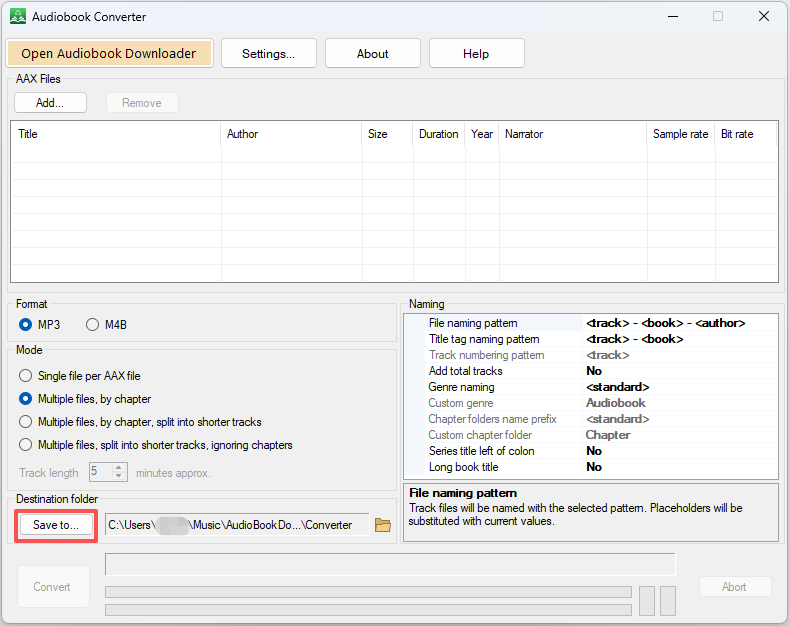
Before using Audiobook Converter, you need to configure the Destination folder. Click the “Save to” button and choose a folder to use as your destination.
Use Audiobook Converter
Once the configuration is complete, you can start converting your .AAX files.
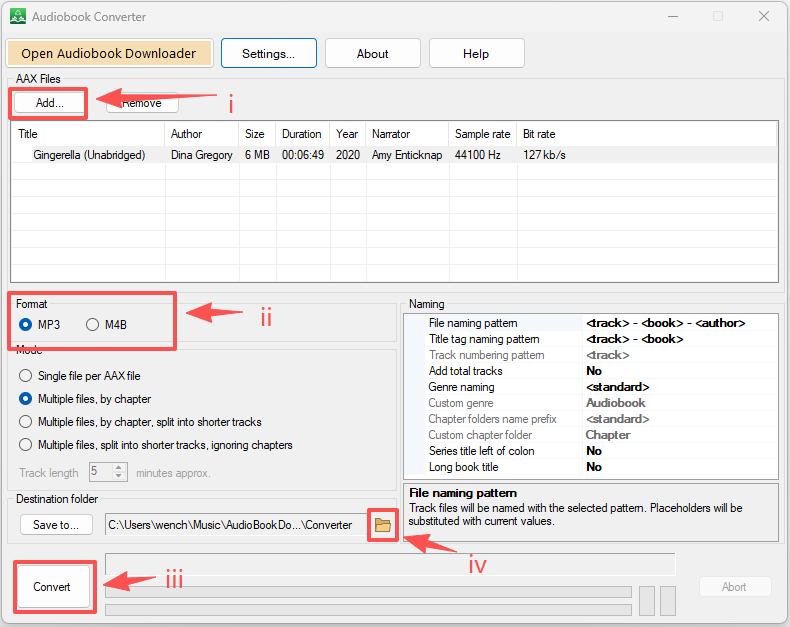
i) Click the “Add” button to add your AAX files.
ii) Choose the destination format: MP3 or M4B.
iii) Click the button “Convert”.
iv) When tasks are complete, you can click the small button (shown below as iv) to open the destination folder and view the converted files.